You Don’t Need Helm
Helm is to Kubernetes what a luxury SUV is to off-roading: technically more capable, but if you just need to move a family of five to the grocery store, you’re paying for features that’ll never leave the parking lot.
For home labs running a handful of services on k3s, Helm introduces complexity you don’t need. Templating languages, value files, chart dependencies, repository management, it all adds friction. Meanwhile, Kustomize sits there, quiet, doing exactly one thing well: letting you manage Kubernetes manifests without templating syntax at all.
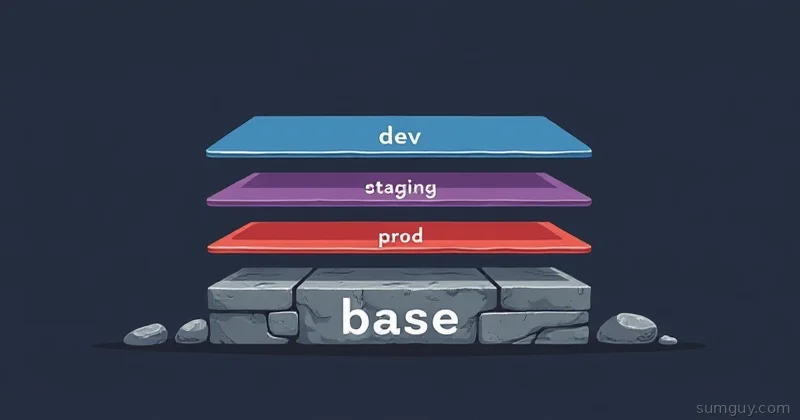
The secret sauce? Overlays. Base manifests + layer-specific customizations = clean separation, no Helm, no headaches.
Kustomize: The Overlay Pattern
Kustomize is built into kubectl (since 1.14). No additional tools. No dependencies. Just a kustomization.yaml file that tells kubectl how to patch, merge, and combine your YAML manifests.
The core idea:
- base/: Production-ready manifests (Deployments, Services, ConfigMaps, etc.)
- overlays/{dev,staging,prod}/: Thin layers that customize the base for each environment
No variables, no templating conditionals. You write real Kubernetes YAML. Overlays apply patches on top.
It’s essentially a photo editor: the base is your original image, overlays are adjustment layers that change colors or crop without destroying the original.
Directory Structure
Here’s what a typical home lab setup looks like:
my-app/├── base/│ ├── kustomization.yaml│ ├── deployment.yaml│ └── service.yaml├── overlays/│ ├── dev/│ │ └── kustomization.yaml│ ├── staging/│ │ └── kustomization.yaml│ └── prod/│ └── kustomization.yaml└── .gitignoreSmall, obvious, no magic. Everyone on your team (even if it’s just you) knows what goes where.
Base Manifests
Your base is straightforward YAML, nothing special. Here’s a simple app:
apiVersion: apps/v1kind: Deploymentmetadata: name: webappspec: replicas: 2 selector: matchLabels: app: webapp template: metadata: labels: app: webapp spec: containers: - name: app image: myapp:latest ports: - containerPort: 8080 env: - name: LOG_LEVEL valueFrom: configMapKeyRef: name: app-config key: log_level resources: requests: cpu: 100m memory: 128Mi limits: cpu: 500m memory: 512MiapiVersion: v1kind: Servicemetadata: name: webappspec: type: ClusterIP ports: - port: 80 targetPort: 8080 selector: app: webappThe ConfigMap does not get a file of its own. Generate it from the base kustomization instead:
apiVersion: kustomize.config.k8s.io/v1beta1kind: Kustomization
resources:  - deployment.yaml  - service.yaml
configMapGenerator:  - name: app-config    literals:      - log_level=info
labels:  - pairs:      app: webapp      managed-by: kustomize    includeSelectors: false
That’s it. The base kustomization.yaml lists what files to include, generates the ConfigMap, and applies common labels everywhere.
Generating the ConfigMap rather than writing base/configmap.yaml by hand buys you the one thing that matters in practice: Kustomize appends a content hash to the generated name (app-config-26mmg88m44) and rewrites every reference to it, including the configMapKeyRef in the Deployment. Change a value, the name changes, the pod spec changes, and Kubernetes does a rolling restart on its own. A hand-written ConfigMap keeps its name forever, so your pods sit there serving the old config until you remember to bounce them.
If you have seen commonLabels in older tutorials, stop using it. Kustomize v5 prints a deprecation warning for it, and worse, it injects your labels into spec.selector.matchLabels on the Deployment and into the Service selector. Deployment selectors are immutable, so bolting commonLabels onto a workload that already exists makes every future kubectl apply fail until you delete the Deployment. The labels block above with includeSelectors: false labels the objects and leaves selectors alone.
Overlays: Dev, Staging, Prod
Now the interesting part. Dev needs 1 replica, verbose logs, smaller resources. Prod needs 3 replicas, warn-level logs, more memory. Staging sits between.
Kustomize patches let you change specific fields without duplicating the entire manifest.
apiVersion: kustomize.config.k8s.io/v1beta1kind: Kustomization
resources:  - ../../base
replicas:  - name: webapp    count: 1
patches:  - target:      kind: Deployment      name: webapp    patch: |-      - op: replace        path: /spec/template/spec/containers/0/resources/requests/memory        value: 64Mi
configMapGenerator:  - name: app-config    behavior: merge    literals:      - log_level=debug
The log level comes from the ConfigMap, so the overlay changes the ConfigMap and leaves the container env block alone. Do not reach for a JSON patch on /spec/template/spec/containers/0/env/0/value here. Kustomize will happily build it, but the result is an env entry carrying both value and valueFrom, and the API server rejects that pair: may not be specified when 'value' is not empty. You only find out at apply time.
apiVersion: kustomize.config.k8s.io/v1beta1kind: Kustomization
resources:  - ../../base
replicas:  - name: webapp    count: 2
configMapGenerator: - name: app-config behavior: merge literals: - log_level=infoapiVersion: kustomize.config.k8s.io/v1beta1kind: Kustomization
resources: - ../../base
replicas: - name: webapp count: 3
patches: - target: kind: Deployment name: webapp patch: |- - op: replace path: /spec/template/spec/containers/0/resources/requests/memory value: 256Mi - op: replace path: /spec/template/spec/containers/0/resources/limits/memory value: 1Gi
configMapGenerator: - name: app-config behavior: merge literals: - log_level=warnSee what happened? Each overlay specifies only the differences. Dev changes replicas and debug mode. Prod ups the resource requests. Zero duplication. Change the base once, all overlays inherit it.
Building & Deploying
To preview what Kustomize will generate:
kubectl kustomize overlays/devTo apply directly:
kubectl apply -k overlays/prodThat -k flag is your friend. It tells kubectl “this is a Kustomization, build it and apply it.”
For GitOps workflows (ArgoCD, Flux), you point your Application or Kustomization resource at the overlay path:
apiVersion: argoproj.io/v1alpha1kind: Applicationmetadata: name: webapp namespace: argocdspec: project: default source: repoURL: https://github.com/you/my-app targetRevision: main path: overlays/prod destination: server: https://kubernetes.default.svc namespace: default syncPolicy: automated: prune: true selfHeal: trueArgoCD syncs whatever the kustomization produces. One Application resource per overlay (dev points to overlays/dev, prod points to overlays/prod), and you’re golden.
JSON Patches vs Strategic Merge Patches
That patch: |- stuff above is a JSON patch. It’s explicit but verbose if you’re changing multiple fields. Kustomize also supports strategic merge patches, which are more concise:
apiVersion: apps/v1kind: Deploymentmetadata: name: webappspec: replicas: 1 template: spec: containers: - name: app resources: requests: memory: 64MiThen reference it:
patches: - path: deployment-patch.yamlKustomize merges this onto the base Deployment, keeping fields you didn’t specify unchanged. Much cleaner for multi-field changes.
When Kustomize Wins (and When It Doesn’t)
Kustomize shines for:
- Home lab services: Small Deployment counts, few replicas per environment, simple config differences
- GitOps-first workflows: ArgoCD and Flux natively understand
kubectl apply -k; no Helm plugin needed - Teams avoiding Helm fatigue: No chart repos, no dependency hell, no secrets management burden
- Quick prototyping: Write YAML once, patch per environment, commit to git
- Predictability: What you see in your repo is what deploys (WYSIWYG); no surprise value interpolations
Helm is still better for:
- Package distribution: If you’re publishing a reusable app for others to install (e.g., Bitnami charts)
- Complex conditional logic: “Install this only if nodecount > 3” or “use this image tag only in prod”, Helm’s
if/elsehandles it; Kustomize doesn’t - Shared parameter management: If 100 services all need the same PostgreSQL connection string changed, Helm’s values at the chart level are less repetitive than Kustomize’s field generators
- Large enterprise multi-team setups: Where standardization and audit trails matter more than simplicity
For a home lab? Stick with Kustomize.
Real Example: Multi-Replica App with Ingress
Let’s build something closer to reality: a web app with an Ingress for external access:
myapp/├── base/│ ├── kustomization.yaml│ ├── deployment.yaml│ ├── service.yaml│ └── ingress.yaml├── overlays/│ ├── dev/│ │ └── kustomization.yaml│ └── prod/│ ├── kustomization.yaml│ └── hpa.yamlBase Ingress (simple):
apiVersion: networking.k8s.io/v1kind: Ingressmetadata: name: webapp-ingressspec: ingressClassName: traefik rules: - host: myapp.localhost http: paths: - path: / pathType: Prefix backend: service: name: webapp port: number: 80Dev overlay changes the hostname and skips TLS. Use a JSON patch, not a strategic merge patch:
apiVersion: kustomize.config.k8s.io/v1beta1kind: Kustomization
resources:  - ../../base
replicas:  - name: webapp    count: 1
patches:  - target:      kind: Ingress      name: webapp-ingress    patch: |-      - op: replace        path: /spec/rules/0/host        value: myapp-dev.localhost
configMapGenerator:  - name: app-config    behavior: merge    literals:      - log_level=debug
This one bites people. A strategic merge patch containing only spec.rules[0].host looks like it edits the hostname in place. It does not. spec.rules has no merge key registered for Ingress, so strategic merge replaces the whole list, and you get an Ingress with a host and no http.paths at all. It applies without error and then serves 404 for everything. Run kubectl kustomize overlays/dev and read the output before you trust a list patch.
Prod overlay adds TLS and a real domain:
apiVersion: kustomize.config.k8s.io/v1beta1kind: Kustomization
resources:  - ../../base  - hpa.yaml
patches:  - target:      kind: Ingress      name: webapp-ingress    patch: |-      - op: replace        path: /spec/rules/0/host        value: myapp.example.com      - op: add        path: /spec/tls        value:          - secretName: myapp-tls            hosts:            - myapp.example.com
configMapGenerator:  - name: app-config    behavior: merge    literals:      - log_level=warn
And hpa.yaml (only in prod):
apiVersion: autoscaling/v2kind: HorizontalPodAutoscalermetadata: name: webapp-hpaspec: scaleTargetRef: apiVersion: apps/v1 kind: Deployment name: webapp minReplicas: 3 maxReplicas: 10 metrics: - type: Resource resource: name: cpu target: type: Utilization averageUtilization: 70Note what the prod overlay does not do: it never sets replicas. The base ships 2, the HPA sees CPU and settles somewhere between 3 and 10, and nothing in the repo argues with it. Pin replicas in an overlay that also runs an HPA and you get a tug of war. ArgoCD with selfHeal: true keeps writing the repo value back while the HPA keeps writing its own, and the pod count oscillates until you notice. Pick one owner for that field.
Now:
kubectl apply -k overlays/dev: 1 replica, localhost domain, no autoscaling, debug logskubectl apply -k overlays/prod: HPA-managed replicas from 3 up to 10, real domain + TLS, warn-level logs
Base is untouched. Changes cascade automatically.
The Decision: Kustomize or Helm?
Ask yourself:
- Are you deploying a Helm chart from someone else? → Use Helm, you have no choice.
- Are you running a home lab with <20 services? → Kustomize.
- Do you have non-engineer team members installing your app? → Helm charts are more polished for distribution.
- Are you managing 50+ services with complex cross-service configuration? → Helm’s centralized values (or Kustomize with a generator framework) becomes attractive.
- Is your team already comfortable with Helm? → Keep it, switching is friction.
For everyone else, especially home lab folks tired of Helm’s learning curve? Kustomize is the right tool. You get environment-specific manifests, GitOps-friendly output, and zero templating nonsense.
Your 2 AM self, the one debugging why a variable didn’t interpolate correctly, will thank you.
Common Questions
Do I need to install Kustomize separately?
No. kubectl has embedded Kustomize since 1.14, so kubectl apply -k and kubectl kustomize work out of the box. Install the standalone kustomize binary only when you need a newer feature than your kubectl ships, because the embedded copy usually lags the upstream release by a version or two.
Can Kustomize render a Helm chart?
Yes, through helmCharts: in kustomization.yaml, but it needs kustomize build --enable-helm and a helm binary on PATH. ArgoCD supports this only when the repo server has Helm enabled. For a single third-party chart, plain Helm is less setup than wiring the inflation plugin.
Why did my ConfigMap change not restart the pods?
Because you edited a plain ConfigMap resource instead of generating it. configMapGenerator appends a content hash to the name and rewrites every reference, so changed data produces a new ConfigMap name and a rolling restart. A hand-written ConfigMap keeps its name, and running pods keep the old values until you restart them yourself.
Does Kustomize handle secrets?
It has secretGenerator, but that only base64-encodes values, which is encoding and not encryption. Never commit those literals. Pair Kustomize with Sealed Secrets, SOPS, or External Secrets Operator and let the overlay reference the resulting Secret by name.