Intro hook
Kustomize wins for ops-first teams who want GitOps-native overlays they can read at 2 AM, and Jsonnet wins the moment you’re generating dozens of similar resources and want real functions instead of copy-paste YAML.
Kubernetes manifests are either “copy, paste, pray” or “write clever code and argue about it at standup.” Kustomize is the clipboard and tape approach that actually survives a 2 AM crisis. Jsonnet is the clever engineer’s toolkit, real code, real power, and real potential for future-you to groan when the internals age out.
This isn’t a holy war. It’s about the right trade-offs: composition vs programmability, YAML-friendly workflows vs code-driven generation, ease-of-change vs long-term comprehension.
Which Manifest Tool Fits Your Kubernetes Workflow?
| Kustomize | Jsonnet | |
|---|---|---|
| Approach | Patch YAML overlays | Real programming language |
| Learning curve | Low, YAML only | Higher, code and imports |
| GitOps support | Native in Argo CD and Flux | Needs plugins or rendered YAML |
| Best for | Ops-first teams, fast edits | Programmatic generation, reuse |
| Debugging | Plain YAML output | Code errors, less transparent |
What Kustomize is
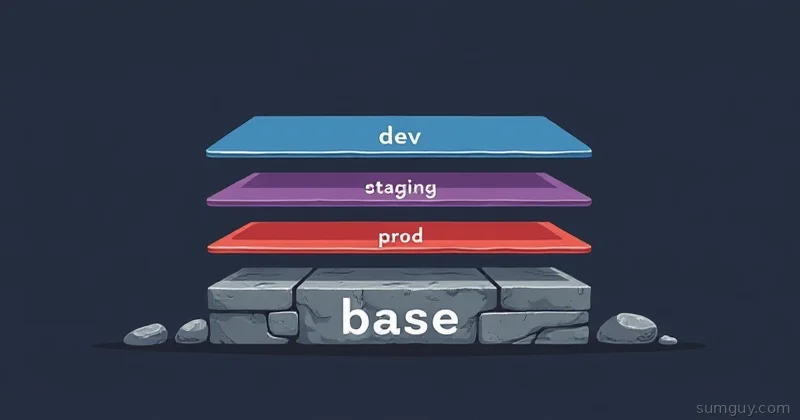
Kustomize treats YAML like paper you can layer and patch. You define a base set of manifests, then create overlays that apply patches or additions. No templating language, no loops, no functions, just declarative composition.
Kustomize’s philosophy is “patch, don’t templatize.” You can keep your manifests human-readable YAML and let kustomize build variants (dev, staging, prod) by applying overlays. It’s especially friendly when your team already thinks in YAML and you want minimal cognitive load.
What Jsonnet is
Jsonnet is a real programming language for JSON (and by extension YAML through conversion). It has imports, functions, conditionals, loops, and libraries. You’re not writing templates, you’re writing code that emits configuration.
That gives you power: reuse via functions and libs, DRY patterns that actually scale, and the ability to generate complex structures programmatically. The downside: it’s code. It needs code practices, reviews, tests, and someone who understands the indirection.
Kustomize in practice: base + overlay example
Kustomize uses a base + overlay pattern. Put shared resources in a base/ folder and environment-specific changes in overlays/dev/ and overlays/prod/.
Example repo layout:
sumguy-app/├── base/│ ├── deployment.yaml│ ├── service.yaml│ └── kustomization.yaml└── overlays/ ├── dev/ │ └── kustomization.yaml └── prod/ └── kustomization.yamlbase/kustomization.yaml:
resources:  - deployment.yaml  - service.yaml
configMapGenerator:  - name: app-config    literals:      - LOG_LEVEL=info
commonLabels:  app: sumguy-app
A strategic merge patch example (overlay adds replica count and image tag):
resources:  - ../../base
patches: - path: deployment-patch.yamlapiVersion: apps/v1kind: Deploymentmetadata: name: sumguy-appspec: replicas: 5 template: spec: containers: - name: sumguy-app image: ghcr.io/kingpin/sumguy-app:stableKustomize also supports JSON6902 patches (you can patch by JSON patch ops), components (reusable kustomize pieces), and generators like configMapGenerator and secretGenerator to create ConfigMaps/Secrets from literals or files.
Generators are convenient but remember: they create resources at build-time (not runtime), and the output is just YAML, keep them in your kustomization files, not in random scripts.
Jsonnet in practice: function generating a Deployment
Jsonnet lets you write a function that returns a Deployment, then call it with different parameters for dev/prod. Save reusable snippets as libsonnet files and import them.
Example layout:
sumguy-app-jsonnet/├── main.jsonnet├── lib/│ └── deployment.libsonnet└── vendor/lib/deployment.libsonnet:
local k = import 'k.libsonnet';
// deployment(name, image, replicas){  deployment(name, image, replicas):: {    apiVersion: 'apps/v1',    kind: 'Deployment',    metadata: { name: name },    spec: {      replicas: replicas,      selector: { matchLabels: { app: name } },      template: {        metadata: { labels: { app: name } },        spec: {          containers: [            {              name: name,              image: image,              ports: [{ containerPort: 8080 }],            }          ]        }      }    }  }}
main.jsonnet:
local dep = import 'lib/deployment.libsonnet';
{  dev:: dep.deployment('sumguy-app', 'ghcr.io/kingpin/sumguy-app:canary', 1),  prod:: dep.deployment('sumguy-app', 'ghcr.io/kingpin/sumguy-app:stable', 5),}
Render with the jsonnet CLI:
jsonnet -J vendor -o manifests.json main.jsonnet# or to get YAML, pipe through yq or use jsonnetfmt then convertjsonnet -J vendor main.jsonnet | yq -P e - > manifests.yamlJsonnet libraries (like the Kubernetes k.libsonnet) help encode common K8s patterns so you don’t hand-roll every field.
The history: ksonnet’s death, Tanka as “Jsonnet for grown-ups”
Ksonnet tried to be “Jsonnet for Kubernetes” and failed spectacularly, it mixed CLI, env concepts, and opinionated patterns, then the community quietly moved on. Ksonnet’s death taught a lesson: building a platform around a DSL is harder than the DSL itself.
Tanka (by Grafana Labs) picked up the torch as a more practical Jsonnet-based approach for Kubernetes. It focuses on environments, clear structuring, and integrates better with GitOps patterns. Think of Tanka as Jsonnet with seat belts: same power, less chance of derailing a cluster when someone writes a dubious loop.
Meanwhile Kustomize was adopted upstream by kubectl (kubectl apply -k) and became the low-friction choice for many teams.
Debugging UX: kustomize edit, jsonnet -e, readability
Kustomize debugging is straightforward: kustomize build overlays/prod spits YAML. If something’s wrong, the YAML is still plain and patchable. You can use kubectl apply -k and kustomize edit helpers to add resources.
Jsonnet debugging is code debugging. jsonnet -e 'import "main.jsonnet"' or jsonnet main.jsonnet produces JSON, then convert to YAML if needed. Errors point to locations in .jsonnet files which can be cryptic if you rely heavily on imports and eval-time indirection.
Readability-wise, Kustomize wins for ops folks who prefer to read YAML. Jsonnet wins for code maintainers who like functions and abstractions. The trade is obvious: Jsonnet is more expressive but can hide what the final YAML looks like until you run it.
The abstraction cost: when Jsonnet is too clever
There’s a slippery slope. Start with a tiny function to avoid repetition, then someone writes a factory that reads a couple dozen parameters and performs stringly-typed magic. Six months later, new hires face a main.jsonnet that looks like a feature-complete application, and they spend a day reverse-engineering why the Deployment has an unexpected label.
Abstraction costs are real:
- cognitive load for reviewers
- harder
kubectl apply -fone-off debugging (you must rebuild to see changes) - accidental complexity if devs treat Jsonnet like their general-purpose scripting language
Rule of thumb: use Jsonnet when you need programmatic generation that saves you real effort. Don’t use it to avoid typing three fields in a single deployment manifest.
Testing/linting story for each
Kustomize:
- Kustomize output is YAML: feed it to
kubeval,conftest(rego),kube-score, orpolaris. - Because inputs are YAML, unit testing is often just running
kustomize buildand asserting the generated YAML contains expected fields.
Jsonnet:
- Jsonnet has
jsonnetfmtfor formatting andjsonnet-lintvariants, but the ecosystem is smaller. - Test by rendering and running the same linters (
kubeval,conftest) on the generated output. Use CI to assertjsonnetruns without error and that produced manifests pass schema checks. - Tanka provides built-in environment support and can run
tk show --dangerstyle checks to preview.
Both require a render-and-validate CI step. The difference is Jsonnet projects often need unit tests for library functions if you go deep into logic.
The Helm + Kustomize post-render pattern
Helm templates are powerful and many teams standardize on Helm charts. Kustomize can be used as a post-renderer for Helm, render a Helm chart, then run kustomize overlays against the result to inject tenancy-specific patches or apply company-wide labels.
Pattern:
- Helm template → YAML
- Kustomize post-render → overlays applied
This gives you Helm’s packaging and values file ergonomics and Kustomize’s patch-based overlays for cluster-specific changes. It’s useful when you want the best of both: chart reuse and non-invasive per-cluster tweaks.
Helm has a --post-renderer flag and there are community helpers to chain these together. Use carefully: the complexity stack grows quickly.
Argo CD / Flux compatibility
Both Kustomize and Jsonnet fit well into GitOps tooling.
Argo CD:
- Native support for Kustomize: add a repo path with a kustomization.yaml and Argo CD renders it.
- Jsonnet is supported via plugins and tools like Tanka; you can also check in rendered YAML but that’s less ideal.
Flux:
- Flux natively understands Kustomize as well. It even has Kustomize controllers that watch kustomizations.
- For Jsonnet, Flux needs custom tooling or you check in rendered manifests; Tanka users often render and commit the output for Flux.
If your GitOps pipeline needs to be declarative and hands-off, Kustomize is the path of least resistance. Jsonnet requires a bit more wiring but integrates fine once set up.
Decision matrix by use case
- You want minimal cognitive overhead, human-readable YAML, and fast on-call edits: Kustomize
- You’re generating many similar objects programmatically (CRs, many similar Deployments), or you want templating power: Jsonnet
- You use Helm charts but need lightweight per-cluster patches: Helm + Kustomize post-render
- You rely heavily on GitOps (Argo CD / Flux) and want native pipeline support: Kustomize
- You need library-driven reuse, functions, and complex generation: Jsonnet (or Tanka)
- Team size small, ops-focused, prefers YAML over code: Kustomize
- Team has devs comfortable with code, testing, and library maintenance: Jsonnet
Here’s a tiny cheat-sheet:
Use Kustomize: small-medium apps, ops-first, GitOps-native.Use Jsonnet: large fleets, generated resources, heavy reuse, when "code" wins.The SumGuy Take: Picking a Winner
If you want something that survives a 2 AM panic without invoking a developer, Kustomize is the sensible forklift: it lifts YAML into place, doesn’t try to be clever, and your on-call self will thank you. It’s the clipboard and duct tape that still runs the cluster.
If you’re building a factory of resources where patterns repeat and human typing becomes a liability, Jsonnet (or Tanka if you need structure) is a precision lathe: it carves exact parts and pays off over time, until it doesn’t, and then you need tests and discipline.
So: for most teams, start with Kustomize. If you hit real pain from repetition or need the expressive power, move to Jsonnet/Tanka, but treat it like code: lint, test, document, and don’t let one clever refactor become the thing nobody can change.
Winner: Kustomize for ops-first reliability; Jsonnet for power users who accept the maintenance bill.
Happy patching. Don’t be the person who writes a Jsonnet macro at 11:45 PM and disappears from Slack until Monday.